


Image SEO for Photographers: 3 Things You Must Do (Every Time!)

When it comes to building a fast, searchable website, image SEO for photographers is a surprisingly big deal. Modern cameras produce massive files, and if you upload them straight to your site without resizing, naming, or adding alt text, you’ll slow everything down and miss out on traffic that could have come through Google and Google Images.
That said, I also know that image SEO is one of those things that can sound really complicated (or like it will take you a ton of time). However, a few small tweaks (like web-sized exports, descriptive filenames, and solid alt text), can make your site load faster, rank better, and help the right clients actually find you. In this post, I’m sharing exactly how to do that!
Table of Contents
But before we dive in—Hi! I’m Melissa—an SEO expert helping portrait photographers get found by dream clients on Google, without the tech overwhelm. Whether you want done-for-you services, coaching, or blogging strategies, I’ve got you covered. Ready to stop being the best-kept secret in your market?
Want the full conversation? Listen to the podcast episode with Alison & me. Prefer to skim? This post breaks it all down step-by-step so you can start implementing right away.
Why Image SEO is Important
Image SEO is one of those things photographers can’t really ignore anymore. Here’s why.
For starters, image file size plays a huge role in the performance of your website overall. Modern cameras are pumping out massive, gorgeous files, but when you upload those straight to your website, it can tank your load speed. Even if your hosting automatically compresses them, starting with giant originals still works against you. Slow pages make visitors bounce, and Google reads that as a bad experience.
There’s another layer too: Google can’t actually “see” your photos. Maybe AI will change that eventually, but for now you need text signals to explain what’s in the image. When you optimize that info, you open up another avenue to get found. Google Image Search sends real traffic. People use it all the time to browse visuals (I was literally looking at couches through image search this week because descriptions weren’t cutting it).
And naming matters. A lot. If your filenames are accurate, you can surface for the right searches. If not… you might show up for things you never intended. I once had a client who misspelled “newborn” in a couple of blog images, changing the B to a P. Her search console was full of disturbing queries until we figured out where it came from. After that, I became an even bigger believer… image SEO can absolutely make or break how you show up online.
Now let’s talk about how to do it well.
1. Rename Your Images Before You Upload Them
This is one of the easiest ways to improve image SEO for photographers.
If you’re uploading straight out of the camera with generic DSC_0001 filenames, you’re giving Google nothing to work with. Renaming before uploading is key (don’t wait until you’ve uploaded them to your website to change them on the back end). In fact, ideally, you’re exporting out of Lightroom with a formula that includes keywords, descriptors, locations, and a numbering system. Lightroom makes it easy to create custom export presets for different niches or locations.
What to rename your images?
For example, if I’m photographing a maternity session at a local winery, I’ll include the winery’s name in the filename. If it’s a newborn shoot in Richmond, I’ll label it “Richmond-newborn-session” along with the family’s name, both so I can keep track and so those keywords can surface in image search. I even include my business name when delivering files to clients, because if they post those images online, the names can help send traffic back to me.
In fact, in our podcast episode about image SEO for photographers, Allison shared about how she treats blog images the same way. Whether she’s sharing a client session, travel content, or doing educational posts, her workflow starts with collecting her images and exporting them into a single folder with the target keyword baked in. Then she goes through and refines the filenames (adding descriptions, locations, and secondary keywords).
2. Reduce Your Image Size
We’ve all hit the back button on a slow website. It loads, it loads, it keeps loading… and we’re out. Nine times out of ten, giant unoptimized images are the culprit. That laggy experience is exactly what Google tries to avoid, because their priority is the end user. Image size directly affects how fast a page loads, and when a site feels sluggish, visitors bail. That’s why every image, from background banners to blog photos to tiny profile icons and favicons, needs to be sized correctly for its job.
How to resize your images for image SEO
So what does “web-sized” actually mean?
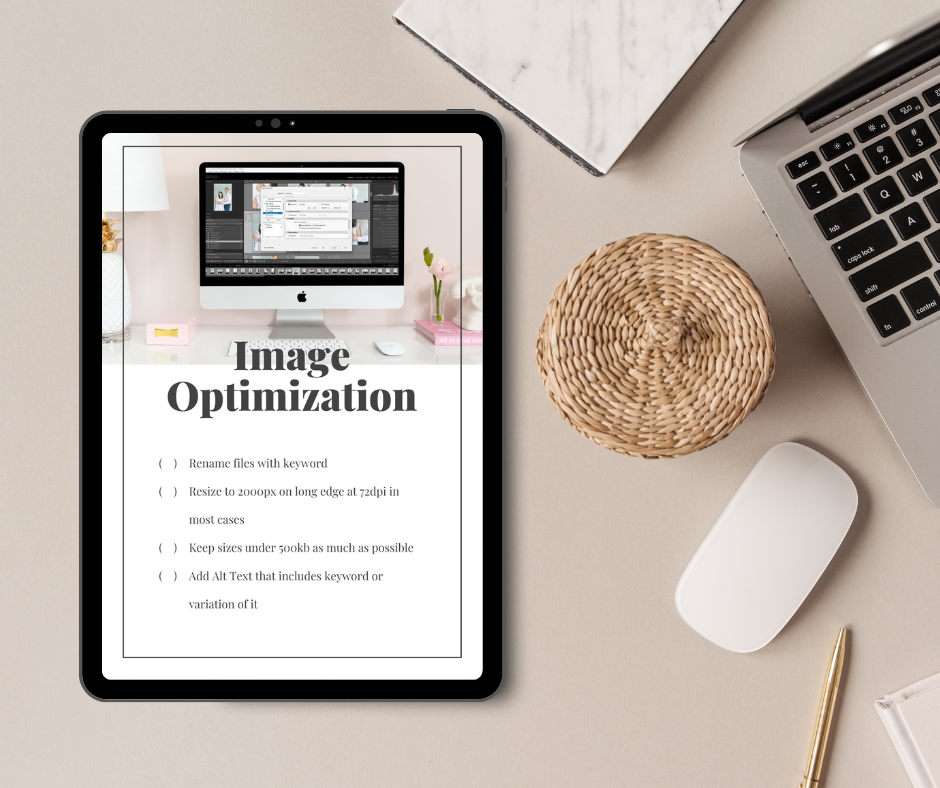
For most photographers, it’s different from what you deliver to clients. Clients need full resolution for prints. Your website does not. For blogs, galleries, and social, smaller is better. A super easy rule of thumb is exporting around 2000 pixels on the long edge (or 2600 pixels for a background canvas header image). That works for most layouts and still looks great. For resolution, 72 DPI is standard for web, while print usually lives somewhere in the 150–300 DPI range.
Then there’s file weight. I try to keep web images under 500 KB. A few years ago I aimed lower, but these new cameras are monsters and shrinking the files too much can make them look awful. Sure, some speed checkers will insist everything should be under 100 KB, but that’s not happening unless you want your work to look like it’s trash. No photographer wants that. The sweet spot is small enough to keep your site fast, but not so tiny that the images look bad (because that won’t get you hired).
If you see anything larger than 1 MB on your site, go fix those. Re-export, resize, or compress. Lightroom makes it pretty straightforward, and you can save presets so you don’t have to reinvent the wheel every time. I use ~2000px at 72 DPI for most images and then go smaller for anything that doesn’t need to be huge (like for vertical images, I will typically size around 900px). If you have a background image that stretches the full screen you may need to up that 2600px or more.
3. Add Alt Text
Let’s talk alt text—short for “alternative text.” It’s basically the written description of an image that Google can read because it’s made of words, not pixels. Screen readers also rely on alt text to describe photos for visually impaired users, so it’s both an accessibility feature and an SEO feature.
So why do photographers skip it? Because it’s tedious. Truly tedious. We all know it. But it matters. Good alt text helps users and gives Google helpful context about what’s in the image.
What to write for Alt Text?
How do you actually write it? You just describe what’s there—family of three, newborn in studio, maternity session outdoors, vineyard, wedding ceremony, etc. Work your keywords in naturally (including location), keep it under about 125 characters, and don’t start with “image of” or “photo of” because that’s obvious and screen readers already know it’s an image.
For example:
- “Mom looking down at pregnant belly at Veritas Winery.”
- “Sleeping newborn girl in pink during studio session in Charlottesville.”
- “Baby asleep in crib during Charlottesville newborn session.”
The key is variety. What you don’t want is something like IMG_546. Slightly better but still weak would be “newborn photo.” The ideal is descriptive and specific, like:
“Sleeping newborn baby girl wrapped in pink during studio session in Charlottesville.”
Also, don’t repeat the exact same alt text on every image. That can look like keyword stuffing, especially if all your files have the same target phrase. Switch it up—“Charlottesville newborn session,” “Charlottesville newborn photos,” and “newborn photography in Charlottesville” are all similar but give Google more natural variation.
Check out our post on 10 Ways to Use AI in Your Photography Business, I shared a hack to get AI to help with writing alt text!
Download the Free Image Optimization Checklist
If all of this feels overwhelming, I’ve got a simple image optimization checklist you can download. It covers file naming, sizing, specs, and alt text all in one place. Grab your image optimization checklist here!
If you liked this post, we think you’ll love these:
How Long Does SEO Take to Work? The Truth About Photography Business Rankings
Blogging for Photographers: Why It Beats Social Media
AI Search SEO vs Traditional SEO: Why They’re Actually the Same Thing
Wondering why your website isn’t bringing in inquiries? I’m covering the 5 biggest SEO mistakes photographers make in my free masterclass.
Watch now → https://pictureperfectrankings.com/5-mistakes


I’m Melissa Arlena, founder of Picture Perfect Rankings, where we help portrait photographers get found on Google and transform from invisible experts into market leaders. With 15+ years of photography experience and an IT background, I’ve helped hundreds of photographers break free from feast-or-famine cycles by achieving page 1 rankings that attract their dream clients through search.

Leave a Reply


I'm Melissa Arlena(my friends call me Mel) and I help photographers get found on Google.
Read more about me

I'm so glad you're here
Hello!

© 2023-2026 Picture Perfect Rankings : SEO for photographers. all rights reserved. privacy policy.