


The Ultimate Photography Website Redesign SEO Checklist in 2026

It’s January, and we all know what that means in the photography world: updating our websites. While for a lot of us that might mean just new images, I know for some photographers it could also mean a complete redesign, changing platforms, etc. This is the time to do it. That’s why we’re sharing this photography website redesign SEO checklist!
If you’ve been rocking your SEO and your website is ranking really well, but you’re tired of the design, I’ve been there many times, and you’re thinking, “I need an overhaul,” but you’re worried about losing rankings? This article is for you.
Before we dive in though, if you’re not sure whether your SEO is working well right now, I have a webinar called Five SEO Mistakes Killing Your Photography Business that walks through foundational stuff. Below, I’m more focused on what to do if you already have good SEO and don’t want to mess it up with a redesign. If you’re not sure that you have good SEO (yet), make sure to watch this free training first!
Table of Contents
But before we dive in—Hi! I’m Melissa—an SEO expert helping portrait photographers get found by dream clients on Google, without the tech overwhelm. Whether you want done-for-you services, coaching, or blogging strategies, I’ve got you covered. Ready to stop being the best-kept secret in your market?
Want the full conversation? Listen to the podcast episode with Alison & me. Prefer to skim? This post breaks it all down step-by-step so you can start implementing right away.
Below, you’ll find my complete photography website redesign SEO checklist. I’m even going to be including the common photography website redesign mistakes that tank your Google rankings—and how to protect your SEO while giving your site a fresh look. Whether you’re changing platforms entirely or just updating your design, this step-by-step guide covers the strategic planning and technical steps you need to know.
Step 1: Plan Out Your Photography Website Redesign Ahead Of Time
Whether you redesign everything yourself or outsource it, a website overhaul is a major undertaking. Even when someone else is doing the heavy lifting, it still requires planning, organization, and decisions from you. It’s not as easy as just buying a new template and calling it a day!
Recently, two different photographers came to me already ranking on page one of Google but wanting to change their design. They were (understandably!) afraid to lose what they’ve built. One wanted to keep her platform but switched designs, while the other was hoping to change platforms entirely. They were right to be concerned, and I’m so glad I was able to help!
If you’re doing this yourself, the first step of this photography website redesign SEO checklist is to know what you already have. A quick audit can help you find forgotten pages or outdated content that needs to be removed rather than migrated or re-created.
Here’s what you need to do:
- List out every page in a spreadsheet (and the keywords you’re targeting)
- Decide which pages actually need to be recreated
- Decide with pages are irrelevant or outdated
- Look for what pages you need to create
There’s no point wasting time on old pages and it could actually help you with your SEO if you’re killing off things you don’t do anymore.
Plus, if you’re using a template, remember: just because it comes with a page doesn’t mean you have to that page.
No podcast? Skip it.
No resources? Hide it.
Also, don’t be afraid to hijack a template page for something totally different than what it was meant for. Web designers might cringe, but who cares? If it works for you, it works. And if you want to hire someone to do the SEO migration for you, click the button below!
Step 2: Capture Your Copy and Layout Before You Change Anything
Once you start redesigning a site, it’s really easy to forget what you already had on there (especially copy and headers that were doing heavy lifting for SEO). Before you touch anything, grab screenshots of your pages. A Chrome add-on like GoFullPage will screenshot the whole page so you can save the layout, headers, and copy in one place. Throw them all in a folder so you have a record.
Bonus tip: If you need the actual text, you can copy/paste it into a doc, or upload the screenshots into an AI tool and have it rewrite it for you instead of retyping everything.
Step 3: Check Your Header Code
This gets a little more technical, but before you hit publish on a redesign or switch platforms, you’ll want to make sure you know where all your tech code is living. Think:
- Facebook/Meta pixel
- Google Analytics
- Email form embeds (Flodesk, etc.)
- Pop-ups and other scripts
Most of that lives in header code, but every platform hides it somewhere different. Make sure you copy or save it so you can add it back after the redesign. There’s likely a lot of little code snippets you’ve probably added to your site over time — tracking pixels, analytics, form embeds — and it’s really easy to forget they’re even there. Before you redesign or switch platforms, go find them and make a note. You’ll thank yourself later.
Step 4: Think Beyond Your Main Pages
When you’re listing out pages to recreate, don’t stop at the basics. Do you run seasonal events like cherry blossoms or Santa minis? Do you host workshops or special shoots? Even if those services or offers won’t be live year-round, they can still exist as evergreen or “cornerstone” content that you link to when the season rolls around again. Make a plan for those too.
What Happens If You Don’t Recreate a Page When You Redesign Your Website?
If you rename or delete a page without a redirect, you’ve broken every link that ever pointed to it. Think about every page you’ve ever linked to in blog posts, email sequences, in Google Forms… the list goes on and on. All that traffic and SEO effort just hits a dead end.
Fortunately, there’s an easy fix. Create a redirect. If someone lands on an old URL, a redirect quietly sends them to the new one. That keeps user experience intact and protects all the linking you’ve already done.
I personally use RankMath Pro and one of the things I love about it is that it auto-create redirects when you change URLs. There are also free redirect plugins if you need something simple.
SEO Tip: if you delete a page, redirect it to something similar. Don’t just dump people on the homepage (especially if they were looking for specific info or a product). That’s a fast way to lose people. I would rather, instead of going to your homepage, go to your blog page where I can go search for the similar topic. That would create a much better user experience.
Changing a URL is totally fine — for example, switching from /newborns to /memphis-newborn-photographer — just make sure there’s a path in place so anyone who lands on the old URL gets automatically sent to the right spot. Otherwise, every blog post, email, form, or link that ever pointed there suddenly hits a dead end.
Step 5: Be Careful With Copy That’s Already Ranking
If your site is ranking well, chances are Google likes your copy. That doesn’t mean you can never update it, but a full rewrite is where a lot of photographers accidentally remove the very keywords and phrases that were doing all the SEO heavy lifting. Then rankings fall and you’re left wondering what happened (ask me how I know).
When you rewrite copy — whether on your own, with a copywriter, or with AI — those small keyword cues and phrase placements can disappear fast.
Speaking of new website copy…
Fluffy, poetic copy is fun for brands, but not so fun for Google or users. I’ve seen sites where you read a section and think, “What does this even mean?” Like instead of saying “Portfolio,” it says “What stage of life are you in?” and you’re just sitting there like… huh?
It doesn’t tell Google anything, and it doesn’t tell your reader anything either. It’s just a lot of words to say nothing.
And from a user standpoint, that’s a problem. If someone has to stop and reread your sentence to figure out what’s going on, it’s not working.
Especially now with shorter attention spans and AI everywhere, less is more. A little fluff is fine, but if 95% of your page is fluff, that’s not helping you.
Step 6: Don’t Forget Your Image Alt Text and File Names
Another thing that gets lost during a redesign is image optimization. If you forget to migrate alt text and file names, you’re basically stripping the context Google uses to understand your visuals. This matters whether you’re doing a full redesign or just updating your portfolio.
Make sure:
- File names are accurate and descriptive
- Alt text clearly explains the image
- Both align with what you’re targeting for SEO
For photographers, this is extra important since so much of your site is visual.
When it comes to alt text, I’ll take a folder of all my images and screenshot the folder so I can see all the file names. Then I drop that into AI and ask it to help me write alt text.
I tell it to describe the images and then I give it the variations and keywords I’m targeting for that page. I’ll ask it to use those keywords naturally so I’m not repeating the same one over and over on every image. That’s my little hack. Then I just copy, paste, copy, paste.
If you want a quick cheat sheet on how to make sure you’re doing “image SEO” correctly, grab my image optimization checklist here!
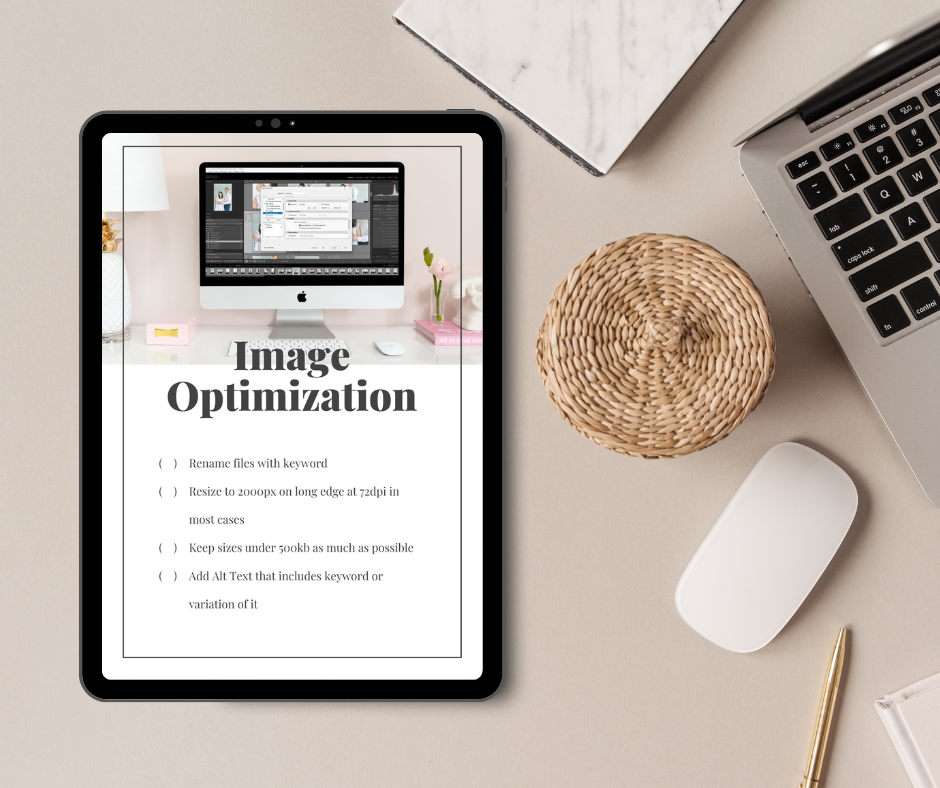
PS: If you’d rather have an expert handle this photography website redesign SEO checklist for you, my Done-for-You SEO Services include it all (specifically designed for photographers!).
Step 7: Don’t Assume Your Website Template Is SEO-Optimized
I can’t tell you how many websites I see that say they’re “optimized for SEO,” or people who tell me, “Oh, my web designer said it’s SEO optimized.” And then later when they’re not ranking, they go back and the designer’s like, “Oh, well it’s just basic SEO.”
And I’m sitting there like… that’s not what you were advertising.
So please, don’t just assume your site is optimized. Go through it. If you don’t know what you’re looking for, look at your current pages and ask: what’s a header, what’s a paragraph, how is this set up? And if that’s confusing, come join my group coaching program — we walk through that stuff.
Check your headings!
This happens a lot when people switch designs. Even if they carry over all the same copy and headers, they later find out nothing was set up properly. Half the page ends up being a header, and there’s a ton of confusion on the backend for Google. I’ve seen testimonial text in H2 before. You can’t be too careful about this.
On top of that, a lot of platforms make it worse because they tie the visual font styles directly to header tags. You end up fighting the theme just to disconnect those things, and sometimes you can’t. That’s a huge pet peeve and a big red flag if you can’t fix it.
Step 8: Save Your Internal Linking Structure
This is similar to the redirects issue I shared above! When designers rebuild layouts or navigation, they often wipe out strategic internal links that were helping your best pages rank. It basically cuts off the juice flow — it completely demolishes that internal linking web you had going.
You really want to keep those connections going, especially with blogs. Blogs linking to pages, pages linking to blogs, blogs linking to other blogs — all of that helps and it all matters.
If you archive a blog post, make sure you have the redirects in place. And this is also why you don’t want to archive your best posts. They’re getting traffic naturally and pointing to other pages, which keeps that SEO flow going.
This ties back to step one where you mapped out your current site. If your homepage was linking to certain key pages and then you stop linking to them in the redesign, those pages may drop because they lost their main internal links.
Most of the time, people don’t even realize they removed those links… they just forget to add them back in. I’m fine if you intentionally remove internal links, but I don’t want you to lose them by accident.
Step 9: Submit Your New Site To Google Search Console
If nothing major changed, your sitemap might update automatically, but this is where plugins can throw things off. For example, the Yoast sitemap lives at a different URL than the RankMath sitemap. So if you switch plugins and don’t update Search Console, you’re basically not giving Google the map to your site anymore.
That’s literally what a sitemap is — a map of your website so Google can crawl everything. If you don’t have one submitted, Google is just driving around without directions. Maybe it finds stuff, maybe it gets lost.
After a redesign, you need to resubmit the sitemap. And for new pages, I manually submit those URLs inside Search Console so Google crawls them faster. It’s super easy.
Step 10: Don’t Forget About Embedded Popup Forms
Another thing I have personal experience with: forgetting about embedded popup forms. This goes back to all that header code that gets tossed in and then forgotten.
For example, my cohost Allison had a popup form from Virginia Beach still running a year after she moved to Hawaii. Someone messaged her and was like, “Hey, you know you still have a Virginia Beach waitlist popup, right?” And she knew it was there somewhere… she just could not find it.
Sure enough, it was buried in the header code on her homepage in the advanced SEO settings.
So don’t forget about old popups for old locations, old niches, outdated workflows, or lead magnets you don’t even deliver anymore.

If you liked this post, we think you’ll love these:
Mastering Local SEO for Photographers During a Business Move
Photography Website Platforms Ranked: From SEO Disaster to Google Gold
Why Blogging for Photographers Is Your Secret SEO Weapon
Wondering why your website isn’t bringing in inquiries? I’m covering the 5 biggest SEO mistakes photographers make in my free masterclass.
Watch now → https://pictureperfectrankings.com/5-mistakes


I’m Melissa Arlena, founder of Picture Perfect Rankings, where we help portrait photographers get found on Google and transform from invisible experts into market leaders. With 15+ years of photography experience and an IT background, I’ve helped hundreds of photographers break free from feast-or-famine cycles by achieving page 1 rankings that attract their dream clients through search.

Leave a Reply


I'm Melissa Arlena(my friends call me Mel) and I help photographers get found on Google.
Read more about me

I'm so glad you're here
Hello!
© 2023-2026 Picture Perfect Rankings : SEO for photographers. all rights reserved. privacy policy.